EasyHotCorners

A lightweight, modular hot corner manager for Windows 11.
Assign actions to any corner of your screen with animated visual feedback.

v1.0.2 — Free & Open Source

Scroll to explore

See it in Action

Watch how a hot corner triggers an action (like Task View) by simply moving your mouse.

Features

Everything you need to supercharge your desktop workflow.

4 Independent Corners

Configure each corner individually with its own action, animation style, color, and dwell delay.

Smooth 60fps Animations

Four animation styles — Arc, Corner Bar, Pulse, Fade Box — rendered with Qt hardware acceleration.

Maximized Window Support

Suppresses corners in fullscreen mode to prevent interruption, with an optional toggle to allow triggers in maximized windows.

Custom Colors

Pick any animation color per corner using a native color picker. Match your desktop aesthetic.

Custom Python Scripts

Drop a .py file into the scripts folder and it appears as a selectable action instantly.

Custom Action Builder

Create actions visually — launch apps, open URLs, or send hotkeys — without writing a single line of Python. Python scripting still fully supported for power users.

Theme & Language

Dark, Light, or System auto-detect themes. English and Spanish out of the box.

Multi-Monitor Support

Hot corners span seamlessly across all connected screens. Turn it on or off as needed.

Advanced Optimization

Fine-tune the trigger radius in pixels and customize the CPU polling interval for ultimate control.

Built-in Actions

Ready to use, no configuration needed.

Toggle Desktop Icons
Lock Screen
Show Desktop (Win+D)
Mute / Unmute Volume
Task View (Win+Tab)
Start Menu
Quick Settings (Win+A)
Notifications (Win+N)
Widgets (Win+W)
Next Virtual Desktop
Previous Virtual Desktop
Task Manager
Open File Explorer
Turn Off Display
Run Dialog (Win+R)
Snip & Sketch (Win+Shift+S)
Clipboard History (Win+V)
Emoji Panel (Win+.)
Volume Up
Volume Down
Play / Pause Media
Next Track
Previous Track

Plus Custom Actions built with the Action Builder (launch apps, open URLs, send hotkeys) and any Python script dropped into the scripts folder.

Custom Scripts

Extend EasyHotCorners with your own Python scripts. Drop a .py file into the scripts folder and it shows up as an action.

my_custom_action.py
import subprocess
import os

# Open your favorite app when you hit the corner
def main():
    app_path = r"C:\Program Files\Obsidian\Obsidian.exe"
    if os.path.exists(app_path):
        subprocess.Popen([app_path])
    else:
        print("App not found")

if __name__ == "__main__":
    main()

Save to %APPDATA%\EasyHotCorners\scripts\ and it will appear in the Settings window.

Important: You must have Python installed on your system to execute custom scripts.

Custom Action Builder

No coding required. Build powerful actions in seconds: launch any application, open a URL in your default browser, or send keyboard hotkeys.
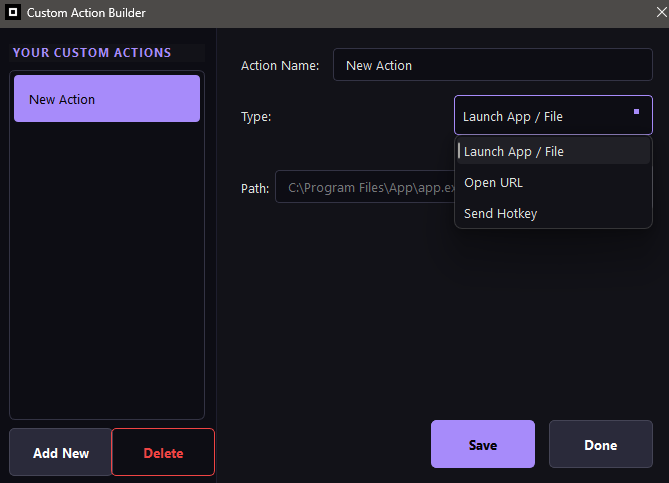
Custom Action Builder dialog

The Action Builder dialog — create, edit, and manage your custom actions.

Python scripting is still fully supported for advanced users who need more control.
Screenshots

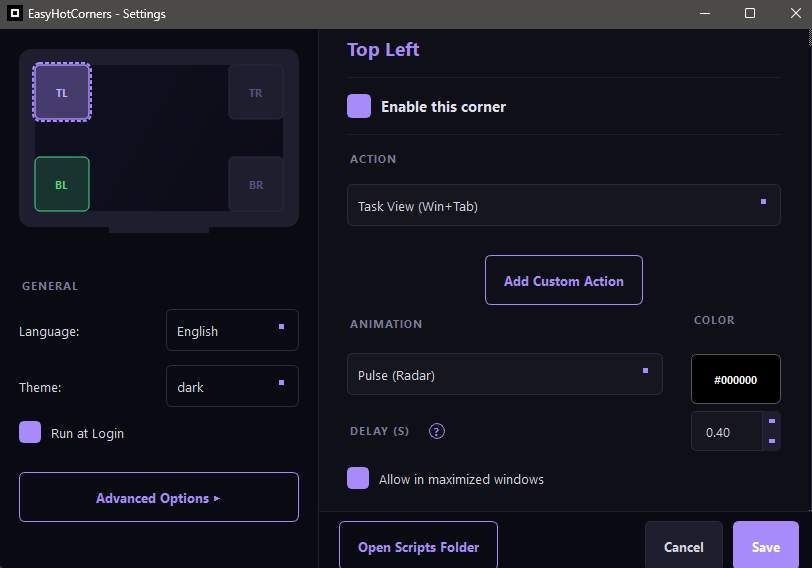
A look at the redesigned settings experience.

EasyHotCorners Settings Window

Settings window with per-corner configuration.

Custom Action Builder

Action Builder — create custom actions visually.

Ready to optimize your workflow?

EasyHotCorners is free, open source

Download v1.0.2 View All Releases